How to Manage a Personal Budget with Expense Categories
Most people track their spending after the fact. They check their bank app, scroll through transactions, and try to figure out where the money went. By that point it's already gone.
A better approach is the one companies have been using for decades: categorize every transaction, compare actuals against a plan, and maintain a rolling forecast. It sounds like a lot of work. With the right setup, it takes about 10 minutes a week.
Start with categories that match your life
Every transaction needs a category. Not "miscellaneous." Not "other." A real label that tells you what the money was for.
A good starting set for most people:
Income: Salary, Freelance, Side projects, Gifts received
Fixed costs: Rent, Utilities, Insurance, Subscriptions
Daily spending: Groceries, Dining out, Transport, Coffee
Lifestyle: Clothing, Entertainment, Healthcare, Travel
Planning: Future taxes, Big purchases, Savings, Emergency fund
Transfers: Moving money between your own accounts
You don't need 50 categories from day one. Start with 10-15 that cover 90% of your spending. Add more when you notice money piling up in a catch-all bucket.
The important part: every transaction gets one. No exceptions. If you skip "small" purchases, your numbers won't add up — and you'll lose trust in the whole system.
Build a budget table, not a spending tracker
Tracking what you already spent is useful but not enough. The real value is in planning ahead.
A personal budget table works like this:
- Rows = your categories (rent, groceries, salary, etc.)
- Columns = months (January through December and beyond)
- Past months show actual numbers — what really happened
- Current month shows actuals next to the plan, so you can see where you stand
- Future months are your forecast — expected income, planned expenses, projected balances
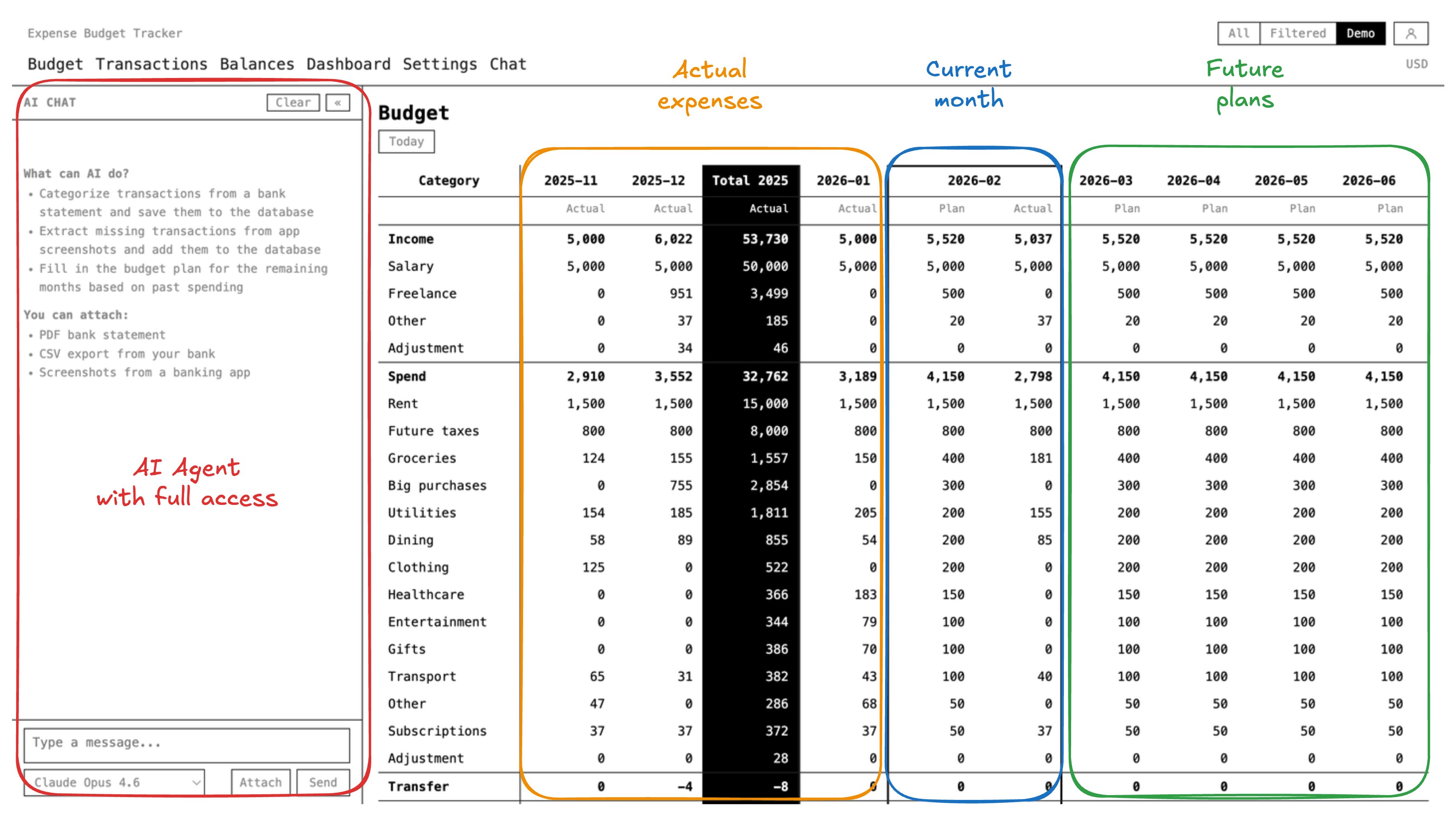
When everything sums up across categories and months, you get a single number for each future month: how much money you'll have. You can scroll ahead and see whether a big purchase in September makes sense — or whether you should wait until November when the forecast shows more room.
This is exactly how companies plan their finances. A CFO doesn't just look at last month's expenses. They maintain a rolling forecast, update it regularly, and make decisions based on projected numbers. There's no reason you can't do the same thing for yourself.
Use AI to handle the boring part
Manually entering transactions is what kills most budgeting habits. You do it for two weeks, get busy, skip a few days, and by the end of the month the backlog feels too big to catch up.
AI agents can take over this part. The workflow:
- Export your bank statements — CSV, PDF, or even screenshot your banking app
- Drop the file into an AI agent that has access to your budget system
- The agent reads each transaction, assigns a category, and records it
- You spend a few minutes reviewing — fix any categories the AI got wrong
- The agent checks that your account balances match the bank
Instead of an hour of data entry per week, you're down to 10 minutes of reviewing what the AI already did.
Handle multiple currencies without extra work
If you have accounts in different currencies — which is common for anyone living abroad or freelancing internationally — each transaction should stay in its original currency. Conversion happens at display time using daily exchange rates.
Don't convert everything manually into one currency at the time of entry. Exchange rates change, and you'll lose accuracy. Store the original amount, and let the system handle the math when you want to see totals.
Close the books every month
At the end of each month, sit down for 15-20 minutes and "close" the month:
- Make sure all transactions for the month are entered and categorized
- Check that your account balances in the system match your actual bank balances
- Compare what you planned to spend vs. what you actually spent, for each category
- Update the forecast for the next few months based on what you learned
This monthly review is where the real insight happens. You'll spot patterns you never noticed — a subscription you forgot about, a category that's consistently over budget, or an income stream that's more seasonal than you thought.
A real-world example
Kirill Markin, the maintainer of Expense Budget Tracker, has been using this exact methodology for over five years — for both his companies and personal finances. He wrote a detailed article about his setup: How I Use AI to Handle My Expenses from Bank Accounts and Budget.
The short version: he drops bank statements into an AI agent once a week, the agent categorizes everything and checks balances, and he maintains a 12-month rolling forecast that he uses to make actual financial decisions. The method started when a financial advisor showed him how companies do budgeting — and he just applied the same approach to his personal money.
Getting started
You can start with a spreadsheet. Create the rows (categories), columns (months), and start filling in numbers. That alone will change how you think about money.
If you want the AI integration and multi-currency support out of the box, Expense Budget Tracker is free and open source. You can use the hosted version or self-host it on your own servers.
The tool matters less than the habit. Pick something, categorize every transaction, maintain a forecast, and review it monthly. That's the whole system.