Self-Hosted Open Source Budget Tracker for Developers — Own Your Financial Data
If you're a developer, your financial data probably lives on someone else's server. Every budget tracker and expense tracker app — Mint, YNAB, Copilot, Lunch Money — stores your transactions, balances, and spending patterns in their cloud. You trust them not to get breached, not to sell your data, and not to shut down (RIP Mint, 2024).
There's a better option if you're comfortable with Docker and Postgres: self-host an open-source budget tracker and keep everything on your own infrastructure.
Open-source expense tracker you deploy yourself
Expense Budget Tracker is a fully open-source expense and budget tracking system built on Postgres. You clone the repo, run make up, and get a working app on localhost:3000 with a real database you control.
No account creation, no data leaving your machine, and no subscription fees. MIT license — fork it, modify it, do whatever you want.
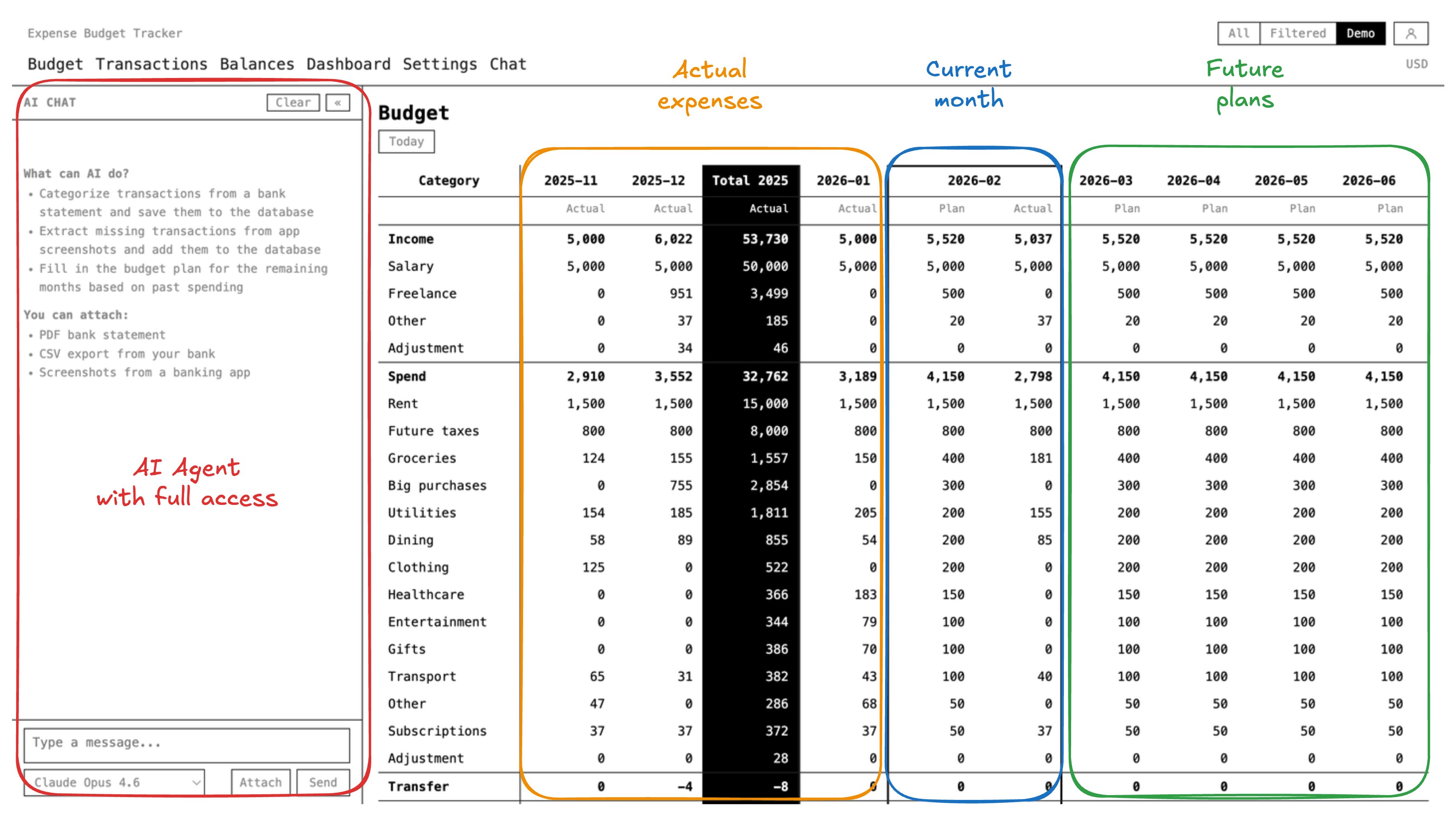
The stack is straightforward: Next.js for the web UI, Postgres 18 for storage, and a TypeScript worker that fetches daily exchange rates. Everything runs in Docker containers via a single docker-compose.yml.
Self-host with Docker or deploy to AWS
The repository comes with two deployment options out of the box:
Local Docker Compose — four commands and you're running:
git clone https://github.com/kirill-markin/expense-budget-tracker.git
cd expense-budget-tracker
open -a Docker   # start Docker if not running
make up          # Postgres + migrations + web + worker
Open http://localhost:3000 and start entering transactions. Postgres data persists in a Docker volume. That's the entire setup.
AWS CDK — a full production deployment with one script:
bash scripts/bootstrap.sh --region eu-central-1
This spins up ECS Fargate, RDS Postgres, ALB with HTTPS, Cognito for auth, WAF, CloudWatch monitoring, automated backups, and CI/CD via GitHub Actions. The estimated cost is around $50/month, and you get enterprise-grade infrastructure that you fully own. The deployment guide walks through every step — from creating the AWS account to configuring Cloudflare DNS.
Since it's just Postgres + Docker, you can also self-host it anywhere else. DigitalOcean, Hetzner, a Raspberry Pi in your closet, your company's Kubernetes cluster — if it runs Docker and Postgres, it runs this.
SQL API endpoint for programmatic access
Most budget apps give you a web UI and nothing else. This one exposes a SQL Query API over HTTP — a POST /v1/sql endpoint that accepts raw SQL statements and returns JSON.
curl -X POST https://api.your-domain.com/v1/sql \
  -H "Authorization: Bearer ebt_a7Bk9mNp..." \
  -H "Content-Type: application/json" \
  -d '{"sql": "SELECT category, SUM(amount) AS total FROM ledger_entries WHERE kind = '\''spend'\'' AND ts >= DATE_TRUNC('\''month'\'', CURRENT_DATE) GROUP BY category ORDER BY total"}'
You generate an API key in Settings, and any HTTP client can query your data. This is a simple REST endpoint — no GraphQL, no ORM abstractions, no SDK to learn. Just SQL in, JSON out.
The security model is strict: API keys are stored as SHA-256 hashes (plaintext never persisted), queries are restricted to SELECT/INSERT/UPDATE/DELETE (no DDL), there's a 30-second statement timeout, a 100-row limit per response, and per-key rate limiting at 10 requests/second. All queries run through Postgres Row Level Security — the same isolation used by the web app — so an API key can only access data in its owner's workspace.
Built for AI agents and LLMs
The SQL API is what makes AI integration practical for personal finance — your AI agent needs direct database access to read and write financial data.
Think about how you interact with AI assistants today. You paste a bank statement screenshot into Claude or ChatGPT, ask it to categorize your expenses, and it gives you a nice text summary. Then you manually copy those numbers into whatever tool you use. That's a workflow from 2023.
With a SQL API, your AI agent doesn't just analyze your data — it writes to your database. The workflow becomes:
- Drop a bank statement (CSV, PDF, or screenshot) into an AI agent
- The agent reads each transaction, matches categories to your existing ones, and
INSERTs them intoledger_entries - The agent checks your account balance against the bank's number
- You spend 5 minutes reviewing instead of an hour entering data
The database schema is designed for this. Seven flat tables, no nested JSON, no complex joins required for basic operations. The ledger_entries table is intentionally simple — one row per account movement with clear column names. An LLM can write correct INSERT statements on the first try because there's nothing to get confused about.
Expense Budget Tracker also includes a built-in AI chat in the web UI. Connect your OpenAI or Anthropic API key, and you get an assistant that has a query_database tool — it can SELECT, INSERT, UPDATE, and DELETE directly in your Postgres. Upload a screenshot of your banking app, and the AI parses every transaction, asks you to confirm, and inserts them. It follows a strict protocol: discover your existing categories first, check for duplicates, verify balances match, and only write after your explicit approval.
The AI chat supports Claude (Anthropic) and GPT (OpenAI) models. Both use the same database tool with the same safety rules — keyword whitelisting, statement timeouts, and RLS enforcement. You can also use the SQL API with any external agent: Claude Code, OpenAI Codex, custom scripts, or Zapier webhooks. Give the agent your ebt_ API key, point it at your endpoint, and it has full read/write access scoped to your workspace.
Budget tracker features
This isn't a bare-bones expense ledger. The features you'd expect from a commercial product are all there:
- Budget grid — rows are categories, columns are months. Past months show actuals, future months show your forecast. Plan 12 months ahead and see projected balances at a glance
- Multi-currency support — store every transaction in its native currency. Daily exchange rates from ECB, CBR, and NBS are fetched automatically. Conversion to your reporting currency happens at query time via SQL joins — no precomputed columns, no accuracy loss
- Account balances — track checking accounts, savings, credit cards, cash, investments. Each account has a running balance derived from the ledger
- Transfers — move money between your own accounts (including cross-currency). Two ledger entries with the same
event_id, one negative and one positive - Transaction categorization — free-form categories that you define. No forced taxonomy. The AI learns your categories from existing data
- Multi-language UI — English, Spanish, Chinese, Arabic, Hebrew, Farsi, Ukrainian, Russian. Full RTL support
- Workspace isolation — Postgres Row Level Security ensures each user's data is completely isolated. Even if you share the same database server, users cannot see each other's data
- Demo mode — toggle a button in the UI to switch to in-memory demo data. No database required to explore the interface
Postgres schema built for developers
The entire schema fits in your head:
ledger_entries— one row per account movement (the core table)budget_lines— append-only budget plan (last-write-wins per cell)budget_comments— notes on budget cellsexchange_rates— daily FX rates (global, no access control)workspace_settings— reporting currency per workspaceaccount_metadata— liquidity classificationaccounts— a VIEW derived fromledger_entries
No ORM. No migration framework. Just numbered SQL files in db/migrations/ applied by a shell script. You can read every migration, understand every table, and write queries directly against the schema.
Schema changes go through migrations. The app database role (used by the web app) has limited privileges — it can't create tables or modify schema. The tracker role (used only by the migration script) handles DDL. This is the kind of separation of concerns you'd expect in a production system.
Why developers self-host their financial data
You already have the skills to run this. You understand Docker, Postgres, and AWS (or whatever cloud you prefer). The question is whether the benefits justify the effort.
Full data ownership — your personal finance data never leaves your infrastructure. No third-party breaches affect you. No privacy policies to read. No analytics on your spending habits being sold to advertisers.
Customization — add columns to the schema, build custom reports with raw SQL, connect it to your existing tools. Want a Telegram bot that reports daily spending? Write a script that calls the SQL API. Want to visualize data in Grafana? Point it at the Postgres database. The code is yours to modify.
No vendor lock-in — if you stop using the web UI, your data is still in a standard Postgres database. Export it with pg_dump, query it from any SQL client, or migrate to something else entirely.
Learning — the codebase is a real-world example of Next.js + Postgres + Docker + AWS CDK + Row Level Security + API key auth + AI tool integration. If you're building a SaaS product, you'll find patterns worth stealing.
Get started with the open-source budget tracker
git clone https://github.com/kirill-markin/expense-budget-tracker.git
cd expense-budget-tracker
make up
Open http://localhost:3000. Enter your first transaction. Set up a budget for the current month. If you want to test without a database, click the Demo button in the header to switch to in-memory sample data.
When you're ready for production, follow the AWS deployment guide or adapt the Docker Compose setup for your own infrastructure.
The repository is at github.com/kirill-markin/expense-budget-tracker. Star it, fork it, or just read the code. It's MIT licensed — use it however you want.
If you already manage servers and databases for work, running the same stack for your personal finances is a small step — and you get full control over the data.